📚 How to Apply for Retotaling of Class 12 NEB Results [Complete Guide]
Did you get NG (Not Graded) or are you unsatisfied with your marks in your Class 12 NEB Board Exams? Don’t worry – you still have a chance to improve your results through retotaling.
Here’s a step-by-step guide on how to apply for retotaling from the official NEB website.
🔹 Step 1: Visit the Official NEB Website
Open your web browser and go to 👉 neb.gov.np
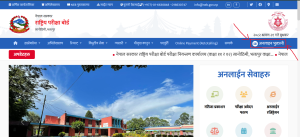
You will see a homepage like this:

🔹 Step 2: Click on “Online Bhuktani (अनलाइन भुक्तानी)”
At the top-right corner of the website, you’ll see the option Online Bhuktani (अनलाइन भुक्तानी).
Click on it to proceed.
🔹 Step 3: Enter Your Details
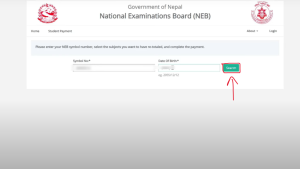
You will be asked to enter your:
-
Symbol Number
-
Date of Birth (DOB)
Then click on the Search button.
🔹 Step 4: Select Subjects for Retotaling
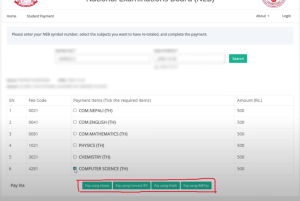
After clicking search, your result details will appear. Now:
-
Select the subject(s) you want to apply for retotaling.
-
The retotaling fee is Rs. 500 per subject.
Once selected, scroll down to the payment section.
🔹 Step 5: Choose a Payment Gateway
You will now see multiple payment gateways (like eSewa, Khalti, ConnectIPS, etc.).
-
Choose the one you’re most comfortable with.
-
Complete the payment process.
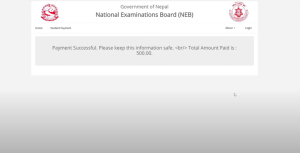
After successful payment, you will see a confirmation message like this:
🔹 Final Step: Wait for the Results
Once your application is submitted:
-
NEB will review your request.
-
Re-totaled results will be published within 15 days.
🔄 Want to Recheck Your Papers?
If you’re still not satisfied and want your answer sheets to be rechecked manually, you can also apply for Rechecking.
-
Fee: Rs. 2000 per subject
-
The detailed process for rechecking will be published soon, so stay tuned!
📢 Share this blog with your friends who may need this information, and follow us for all updates related to NEB Results, Retotaling, and Rechecking.
✍️ By Easy Notes Nepal
📌 For more educational updates and notes, visit: easynotesnepal.com